Finance operations

AP Automation

Supplier invoices captured, matched to purchase orders and receipts, and routed to the right approver, with the evidence for every step recorded.
Working build

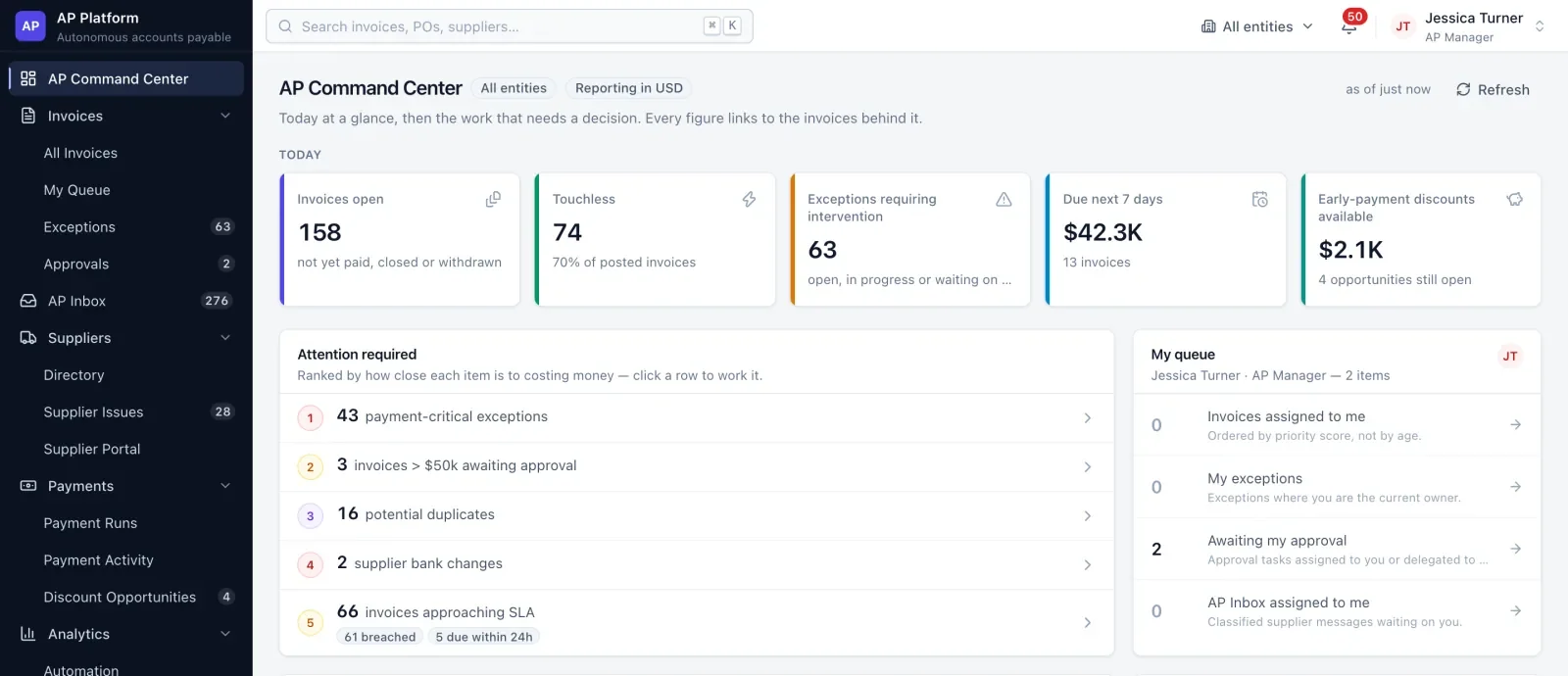
AP Automation command center showing open invoices, touchless rate, exceptions and items needing attention

See it work

Real screens from the working build, with sample data.

An invoice matched to its purchase order, routed by policy and approved.

How it works

  1. 01CaptureInvoices arrive by email, upload, API or supplier portal. Every field is read with its confidence and source.
  2. 02MatchTwo-way and three-way matching at line level against purchase orders and receipts, within tolerances you set.
  3. 03ResolveExceptions get a root cause, an owner, a deadline and a recommended next step with its evidence.
  4. 04Approve and recordPolicy-based approval, then posting, with every step written to a tamper-evident audit trail.

Features

01

Matching you can read

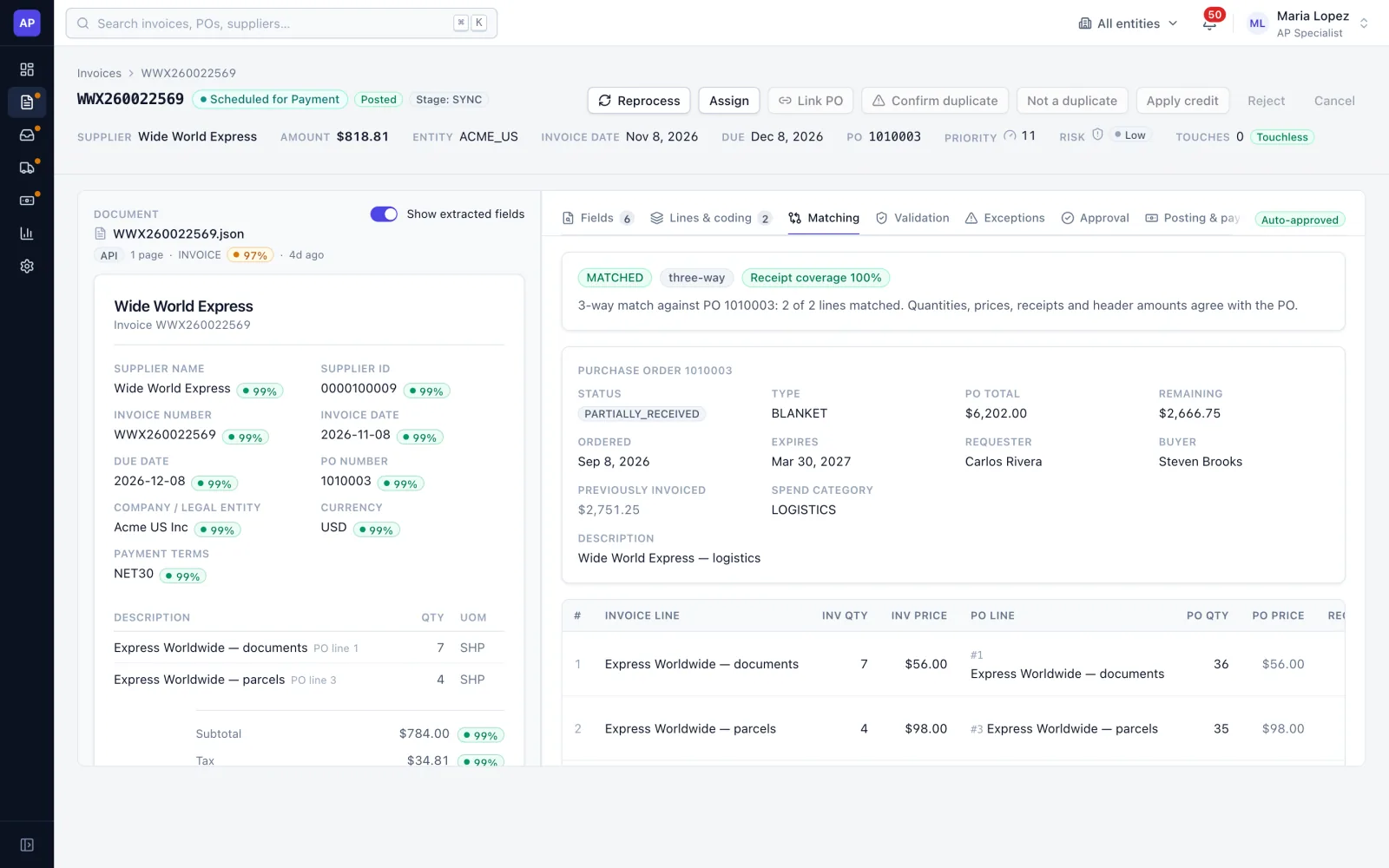
Each invoice is matched line by line to its purchase order and receipts, and the result is explained in plain language, so a reviewer sees why it passed or failed.
  • Two-way and three-way matching
  • Tolerances by supplier, entity, category and amount
  • Confidence on every extracted field
Invoice detail with extracted fields and confidence on the left and a three-way match against the purchase order on the right
02

Exceptions with a next step

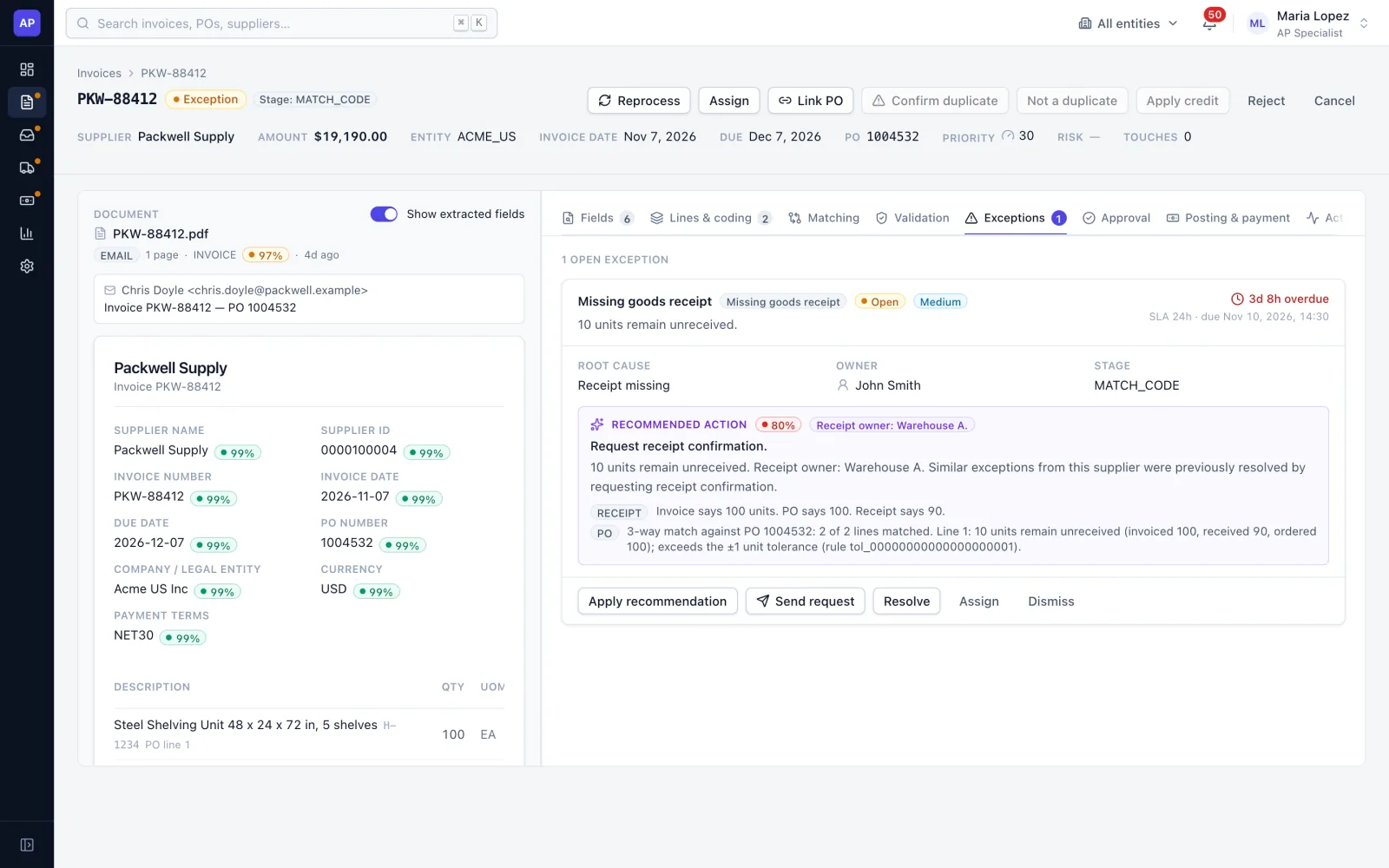
Every exception has a root cause, an owner and a deadline, plus a recommended action that shows the evidence behind it. Requests to receivers or suppliers are drafted and tracked.
  • 28 exception types, each with an owner and deadline
  • Recommended action with confidence and evidence
  • Drafted requests, tracked in one place
A missing goods receipt exception with root cause, owner, deadline and a recommended action citing invoice, PO and receipt quantities
03

Approvals by policy

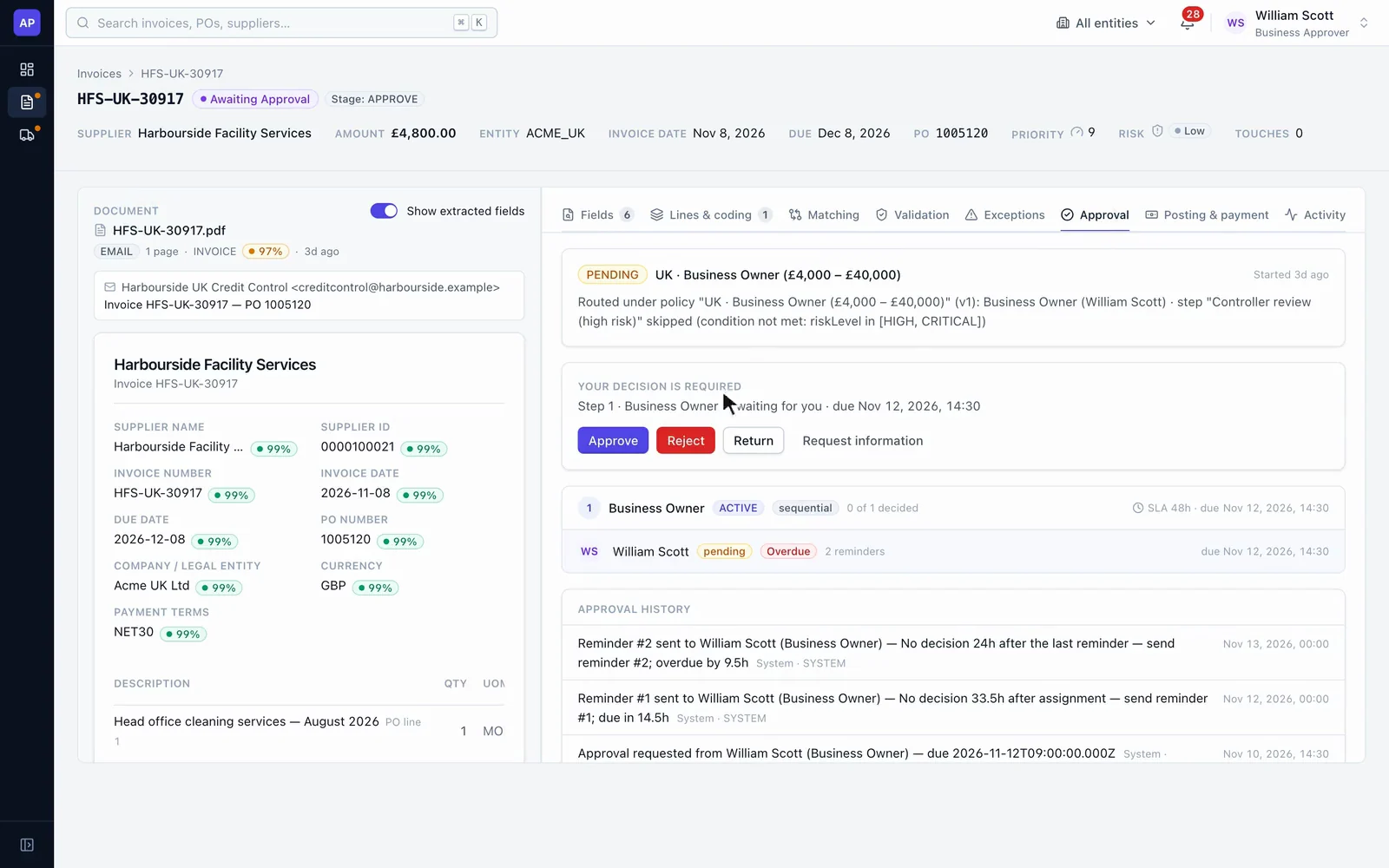
Invoices route by entity and amount through sequential steps, with extra review when risk is high. Reminders and escalation run on a schedule.
  • Automatic approval for low-risk matched invoices, within limits you set
  • Delegation, approval limits and segregation of duties
  • Scheduled reminders and escalation
An invoice awaiting a business owner's approval, showing the routing policy and Approve, Reject and Return actions
04

An audit trail you can verify

Each event records who or what acted (a person, a rule, the system or an AI step) and the confidence behind it. The log is append-only and hash-chained, so any change is detectable.
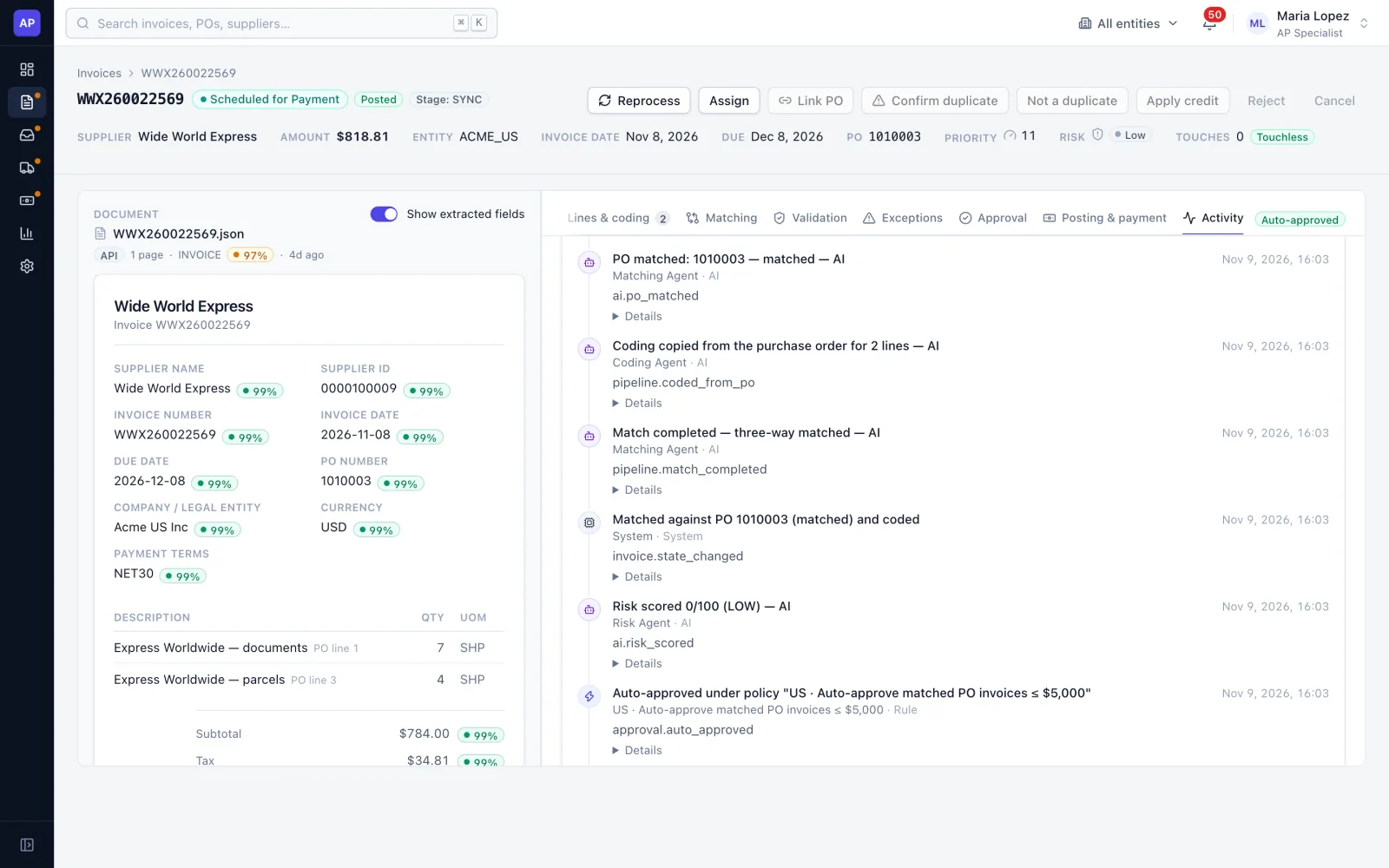
  • Append-only, hash-chained event log
  • AI steps labeled with confidence and explanation
  • Verification of the full chain
Activity log for an invoice showing AI matching, coding, risk scoring and automatic approval under a named policy

Details

Intake
Email, web upload, REST API and supplier portal. EDI, PEPPOL and e-invoicing networks are planned.
Capture
Structured and text-PDF extraction. Scanned-image OCR and commercial capture services connect through an interface.
Matching
Two-way and three-way, line level, with configurable tolerances.
Approvals
Policy routing, delegation, limits and segregation of duties. Email, Teams and Slack approvals are planned.
ERP
One adapter for SAP S/4HANA and ECC, Oracle, Dynamics 365, NetSuite and Workday, tested against simulated systems. The live connection is set up for each client.
Entities
Multiple legal entities and currencies, including USD, GBP and INR, with VAT and GST.
AI
Matching, coding and risk steps show confidence and evidence, and you set the thresholds for automatic, review and manual handling.
Payments
Payment status is read back from the ERP. Payment execution stays in your ERP.

Where it stands

A working build running on sample data. Integrations are set up for each client.

Built and working

  • Capture, matching, exceptions, approvals and audit trail
  • Command center and exception workbench
  • Multiple entities and currencies
  • ERP adapters, tested against simulated systems

Next

  • Live ERP connection with a first client
  • Single sign-on and directory sync
  • EDI and e-invoicing intake
  • Supplier portal beyond demo grade

Common questions

Does it replace our ERP?

No. It works ahead of your ERP: invoices are captured, matched and approved here, then posted to the ERP, which stays your system of record.

Which ERPs does it connect to?

It has one adapter for SAP S/4HANA and ECC, Oracle, Dynamics 365, NetSuite and Workday, tested against simulated systems. The live connection is set up and tested with each client.

Where is AI used, and can we check it?

Matching, coding and risk steps show their confidence and the evidence behind them, and you set the thresholds for automatic, review and manual handling. Every step is recorded in the audit trail.

Can it handle several entities and currencies?

Yes. Access is scoped by legal entity, and invoices can be in USD, GBP, INR and other currencies, with VAT and GST.

See it with your own workflow

Bring a sample of your invoices and approval rules, and we can walk through how they would flow.