Sales

Sightline

Prospecting, email, calls and deals in one workspace for B2B sales teams, with every task saying why it is on today's list.
Working build

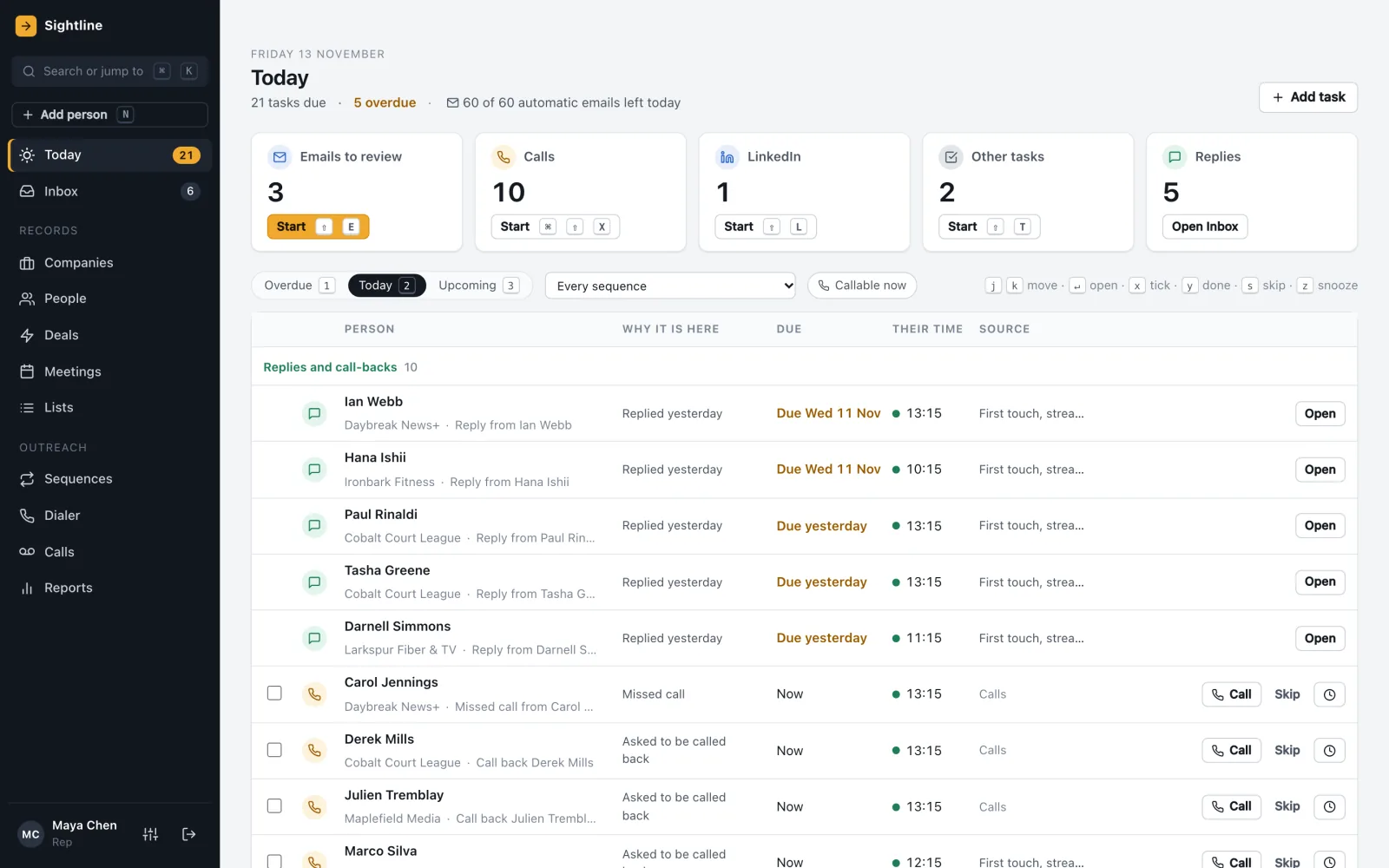
Sightline's Today list: emails to review, calls, LinkedIn and replies, each row saying why it is due

See it work

Real screens from the working build, with invented demo data.

Call prep, a call from the browser, the outcome logged, and on to the next person.

How it works

  1. 01FindBring in people and companies from lists or a Salesforce export, each record keeping its history.
  2. 02Reach outSequences mix automatic emails, emails to review, calls and LinkedIn reminders, sent inside each person's working hours.
  3. 03TalkCall from the browser with call prep and a calling-hours check. Replies land in an inbox sorted by what they mean.
  4. 04CloseDeals move on a board with a reason for every win or loss, and reports show plan, coverage and renewals.

Features

01

Email you review before it sends

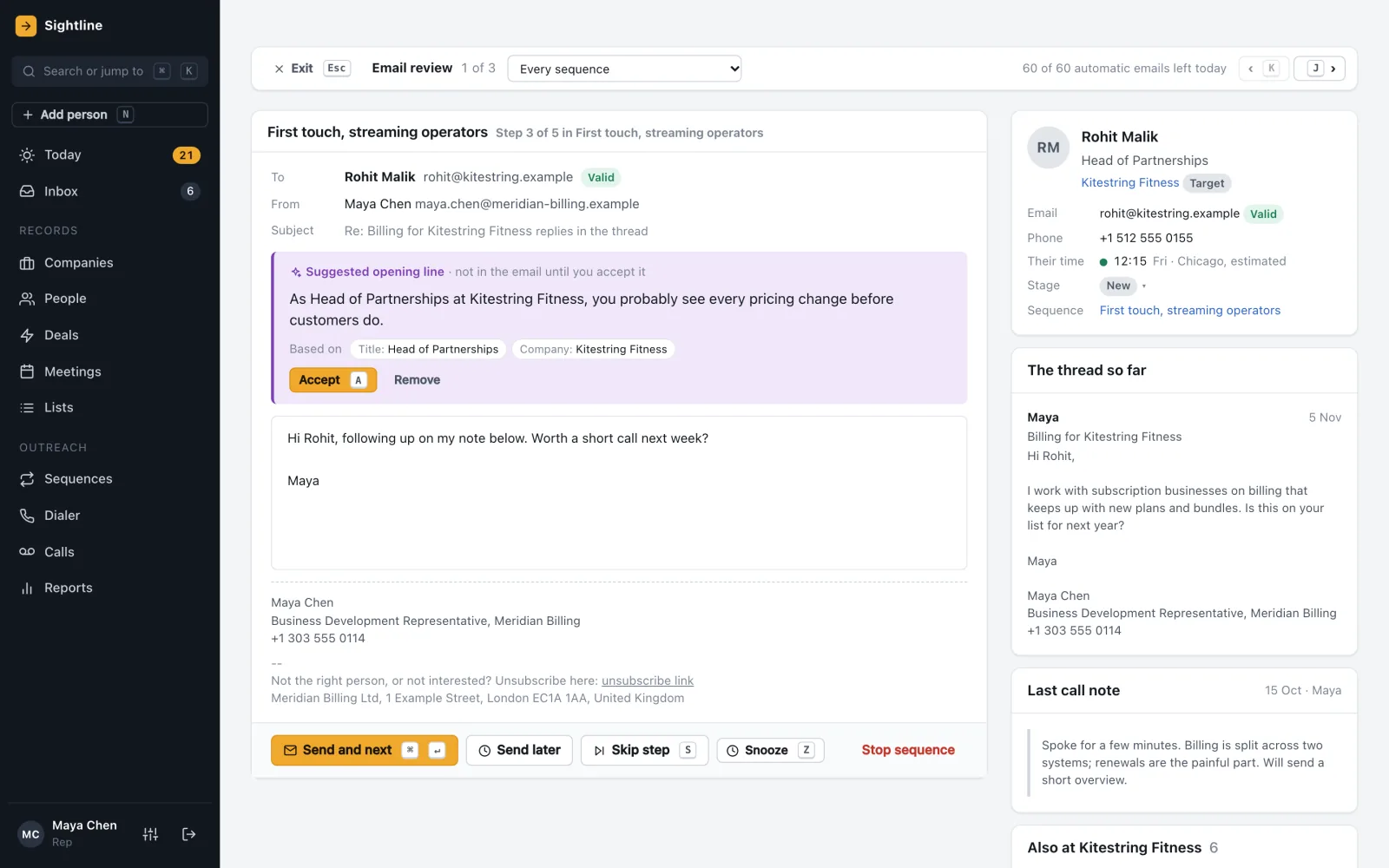
Any step in a sequence can wait for a person. A suggested opening line shows what it is based on and stays out of the email until you accept it, and an email with a missing field will not send.
  • Sends only inside the recipient's working hours
  • Daily caps for every mailbox
  • Replies, bounces and unsubscribes stop a sequence
  • No open or click tracking
Email review with a suggested opening line, what it is based on, the draft and the thread so far
02

Calls from the browser

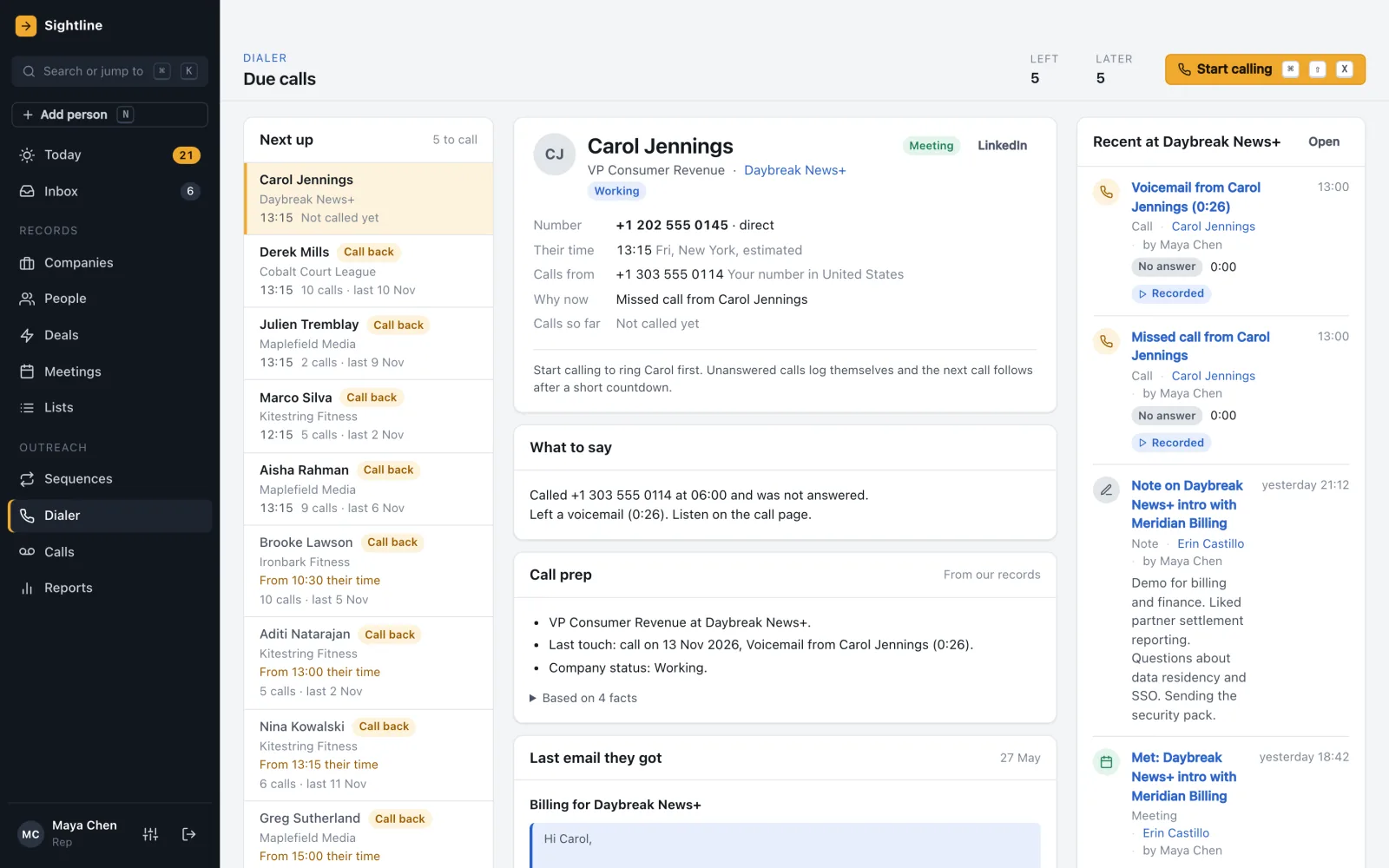
Work through a calling list with call prep drawn from your own records. Every call is checked against the person's local time and place first, and unanswered calls log themselves.
  • Calling-hours rules for 12 countries and 8 US states, each citing its law
  • A short countdown, then the next call
  • Call outcomes logged in one click
The dialer with the next people to call, why now, what to say, call prep and recent activity at the company
03

Deals that need a next step

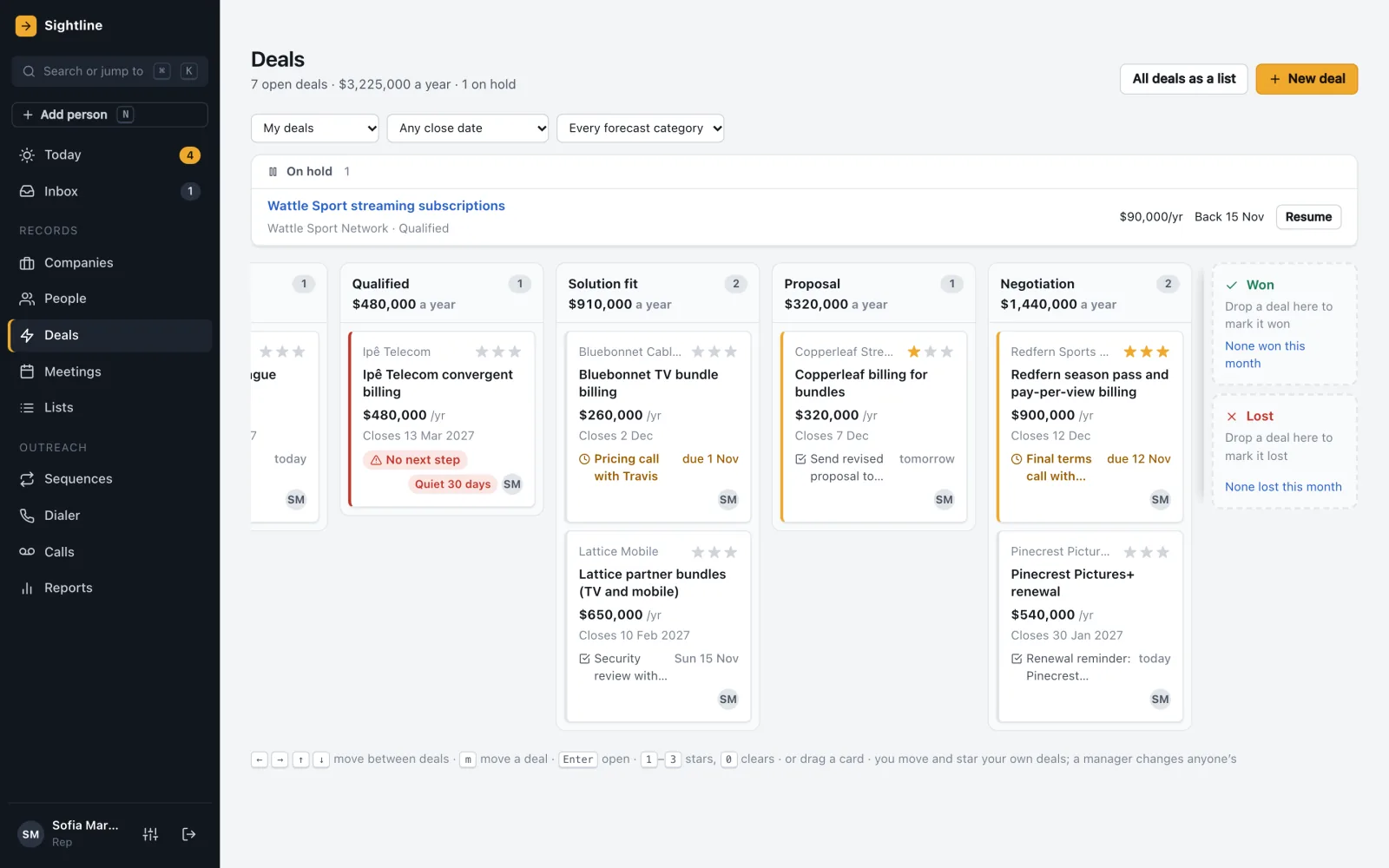
Open deals by stage, with next steps, quiet deals and missing next steps flagged. Won and lost both need a reason, and a won deal makes the company a customer.
  • Next steps and stars on every card
  • On-hold deals with a return date
  • Reps move their own deals; managers can move anyone's
Deals board by stage with amounts, close dates, next steps and flags for quiet deals
04

Reports a manager can act on

Won against plan, coverage of what is left, renewals at risk and what changed since last week. People set the forecast categories; the system does not predict them.
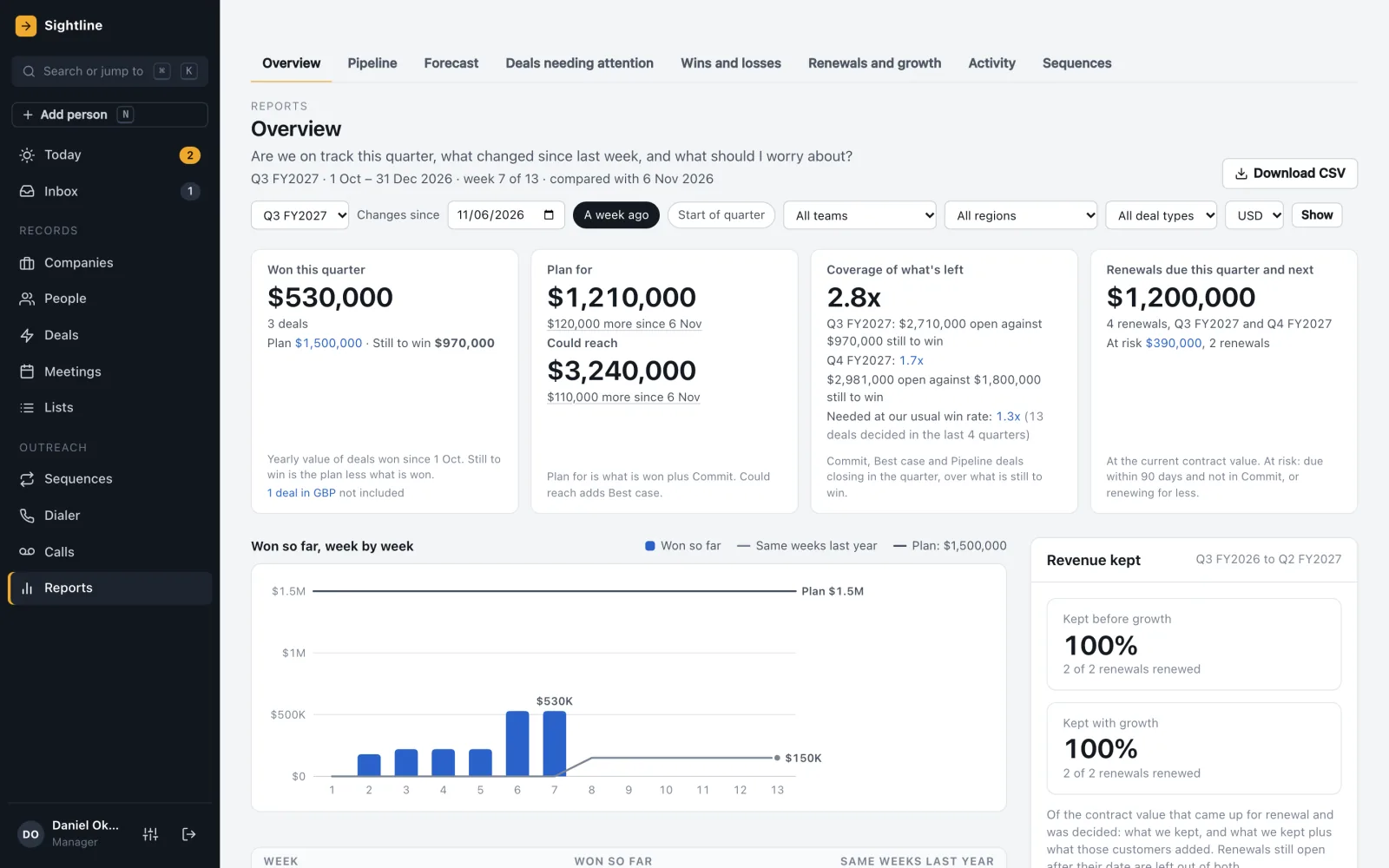
  • Eight report screens and 70+ defined metrics
  • Plan for and could reach
  • Currencies never added together
Reports overview: won this quarter against plan, plan for and could reach, coverage and renewals at risk

Details

Email and calendar
Gmail and Google Calendar capture, built and tested with stand-ins. Outlook is not in version one.
Calling
Browser calling through Twilio, built and tested with stand-ins, plus a demo phone for trials.
Contact data
A contact-data provider connection, built and tested with stand-ins.
AI
Opening lines, call prep and reply sorting, each showing what it is based on, with rule-based versions when AI is off.
Salesforce
A one-time import of a Salesforce data export, 15 object types including deal history, keeping every Salesforce ID. No live sync.
Not in version one
Outlook, booking links, SMS and WhatsApp, a browser extension, LinkedIn automation, predictive dialing and mobile apps.

Where it stands

A working build on demo data. Integrations are built and tested against stand-ins, and connected live for each client.

Built and working

  • Today, inbox, sequences, email review, dialer, meetings, deals and reports
  • Salesforce data-export import
  • Gmail, Calendar, Twilio and AI connections, tested with stand-ins
  • A demo with six months of sample history

Next

  • Live runs on real Gmail and Twilio accounts
  • Undo after send, and merging duplicates
  • Live refresh on the deals board
  • Local times shown the same way on every screen

Common questions

Does it replace our CRM?

It can. Sightline keeps companies, people, deals and activity, and imports a Salesforce data export as a one-time move. It does not sync with Salesforce.

Does it track email opens?

No. There is no open or click tracking. Replies, bounces and unsubscribes are what count.

Where is AI used?

For suggested opening lines, call prep and sorting replies. Each suggestion shows what it is based on, and nothing goes into an email until a person accepts it. With AI off, rule-based versions take over.

Can we try it?

Yes. A demo with six months of sample history shows a rep's day and a manager's view.

See it with your own workflow

Tell us how your team finds, contacts and follows up with prospects today, and we can show the same day in Sightline.